
If you want to log in and change your own website (new photos, updated hours, a fresh blog post), you’ll be using an editing system (sometimes called a CMS). Most small business owners only ever see one or two, so it’s hard to know what “easy to edit” really means until you’re stuck in one.
Here’s what day-to-day editing is actually like in the three options most people consider, Wix and Squarespace, WordPress, plus a lighter option you may not have heard of: TinaCMS.
When we build a site you’ll edit yourself, we offer WordPress or TinaCMS. We ask you to choose at the start, because it shapes how the whole site is built. Switching later isn’t a settings change; it’s close to a rebuild. If you’re still weighing up a builder against a custom site, start with Squarespace vs a custom-built site.
Wix and Squarespace: drag, drop, and design it yourself
Wix and Squarespace are website builders. Everything comes as one package, and you edit by dragging pieces around the page itself.
What it’s like to use:
- What you see is what you get. You edit right on the page, so there’s no guessing how a change will look.
- Nothing to maintain. The company keeps everything up to date for you.
- Total freedom, which cuts both ways. You can move anything anywhere. That also means you can nudge a heading out of line, stretch a photo, or end up with a mobile layout that looks nothing like the desktop one, often without noticing.
- You’re the designer. You get a template, not a design. Filling a blank template so it looks good takes far longer than most people expect.
- It only lives there. Your site runs on their platform and can’t be picked up and moved (more on ownership here).
They suit people who enjoy fiddling with layout and want to build and run the site entirely themselves.
WordPress: the dashboard everyone’s seen
When people picture “logging in to edit my website”, it’s usually the WordPress dashboard: Pages, Posts, Media down the side, and a big blue Update button.
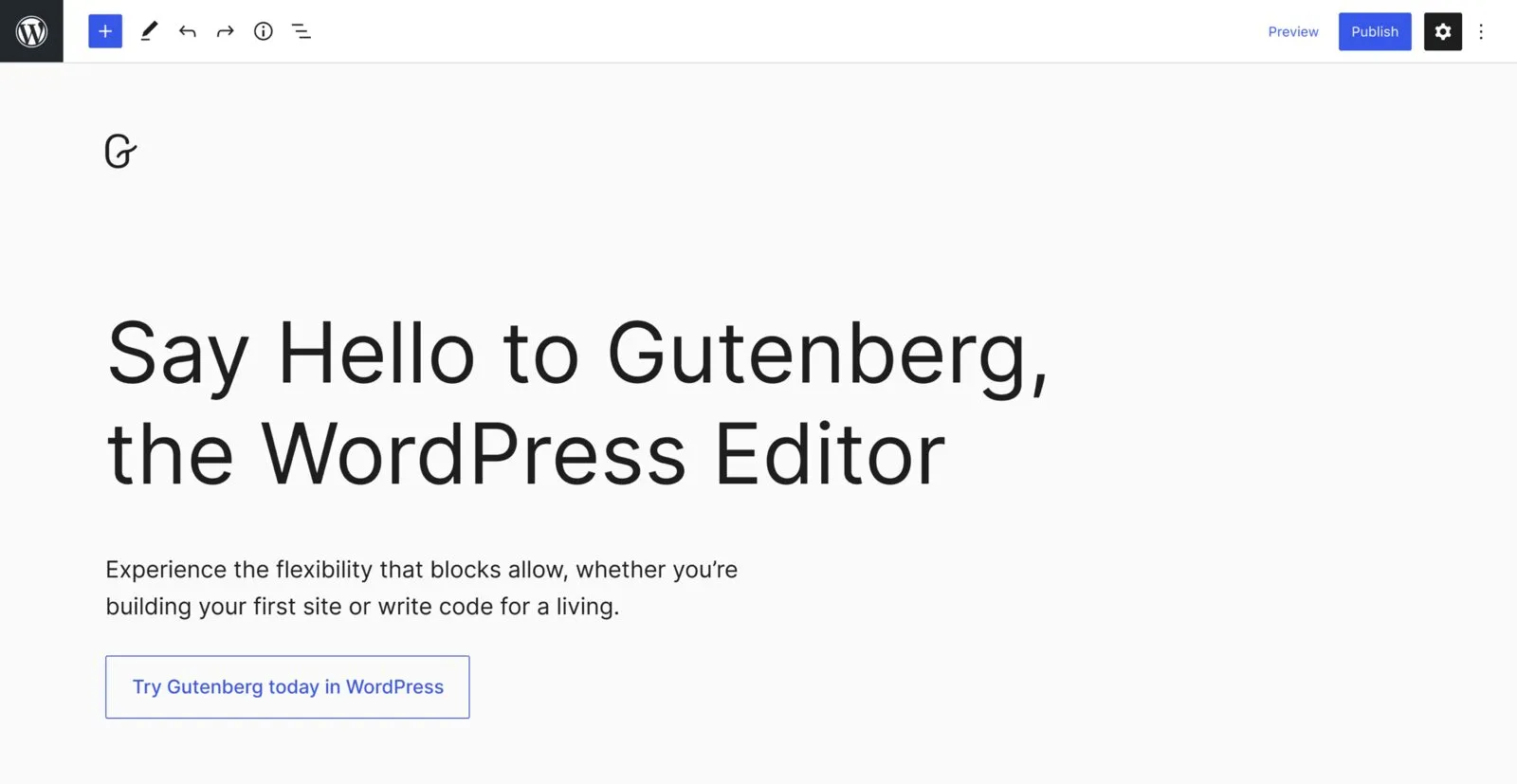
The WordPress block editor. Screenshot: wordpress.org
What it’s like to use:
- Familiar. Plenty of staff, freelancers and marketing people have used it before, and help is a quick search away.
- Does almost anything. Bookings, events, memberships, newsletters: there’s an add-on (called a plugin) for nearly every feature, and many add their own screens to the dashboard.
- Built for teams. Everyone can have their own login, with some allowed to publish and others only to draft.
- Busy. All that flexibility means a crowded dashboard. Every add-on brings more menus and settings, and it’s not always obvious which screen controls which part of the page.
- Easy to knock out of shape. The editor lets you restyle and rearrange content, so it’s possible to break a carefully designed page while trying to change one sentence.
- Needs regular updates. WordPress and its add-ons need frequent security fixes. One security firm found over 11,000 new weak spots in WordPress sites in 2025, almost all of them in add-ons. On our CMS plan we handle those updates and backups, so that’s not your job.
WordPress is the right fit when you need features that only its add-ons provide, or a team that already knows it.
TinaCMS: edit the words, not the layout
TinaCMS is a simpler editor that works with the fast, lightweight sites we build. You log in and see a short form beside a preview of your page. Change the heading, swap a photo, edit a price, hit save, and your site updates a minute or so later.
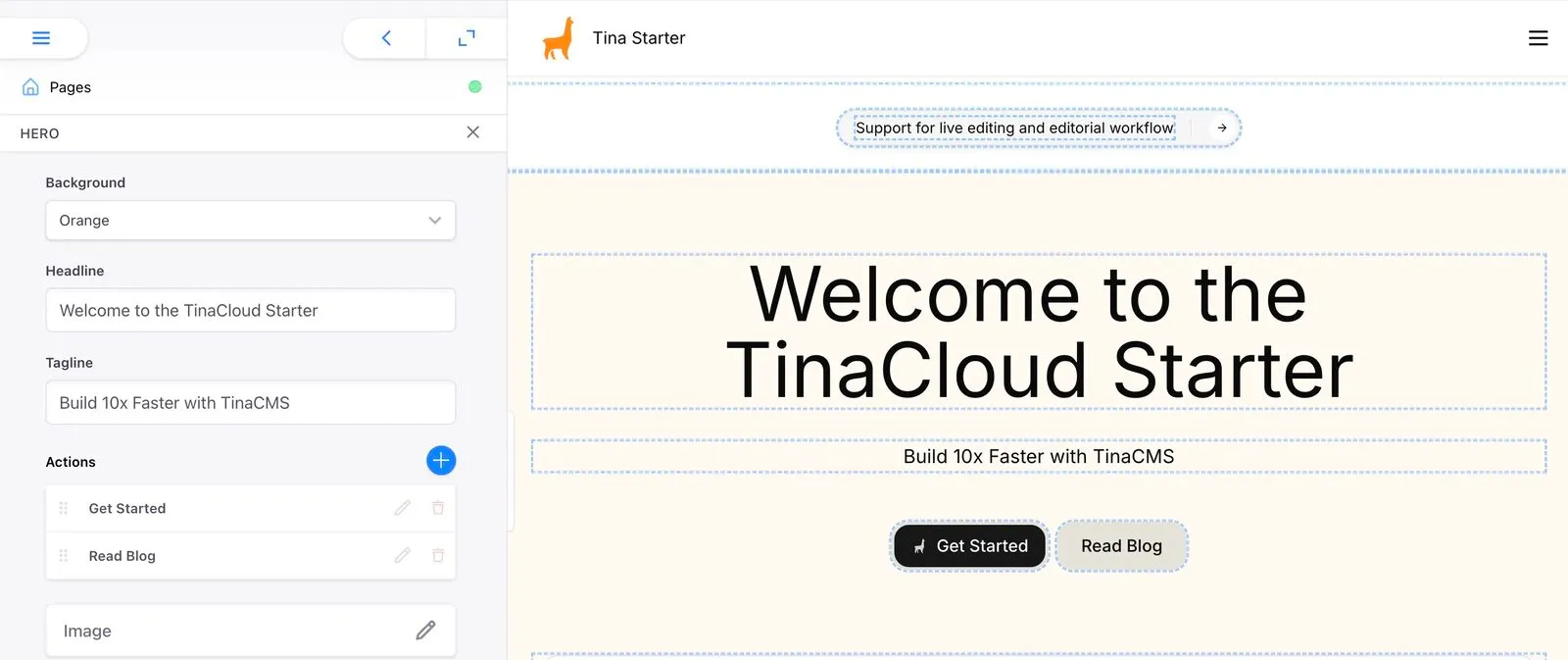
TinaCMS: fields on the left, live preview on the right. Screenshot: tina.io
What it’s like to use:
- Uncluttered. You only see the things on your site that are meant to change: headings, text, photos, prices, blog posts. No menus for features you don’t use.
- Very hard to break. You edit the content, not the layout. However many times you change the text, the page keeps the design it was built with, on phones too.
- Live preview. You can see the change on the page before you save it.
- Mistakes aren’t permanent. Every save is kept, so if something goes wrong, we can put the page back the way it was.
- Your content stays yours. You can have a full copy of your site and everything on it whenever you ask.
- Fast and low-maintenance. Pages load quickly, and there are no add-ons to keep updating.
Where it’s more limited:
- No add-on store. Extras like bookings or a shop get built into your site or linked in from another service, rather than installed with a click.
- Not instant. Changes take a minute or so to appear.
- Less familiar. Fewer people have used it before, though most find it easier to pick up than WordPress.
- Not built for big teams. If several people publish every day and need sign-off, WordPress handles that better.
Which one should you pick?
TinaCMS suits you if:
- You’ll mostly update text, photos, prices and the odd blog post
- One or two people will do the editing
- You want it to be hard to break the design
- You’d rather not think about updates
WordPress suits you if:
- You need add-on features like memberships, event listings or complex forms
- Several people will publish, or your team already knows WordPress
Wix or Squarespace suit you if:
- You want to design and run the whole site yourself
- You’re happy for it to live on their platform for good
And if you’d rather not edit anything at all, that’s an option too (here’s what it looks like).
Most small business sites in Golden Bay, Nelson and Marlborough change a few times a month at most. For them, TinaCMS gives you the editing you’ll actually use, with very little you can break. WordPress is worth the extra complexity when you need what only its add-ons can do. Choose based on how you’ll really use the site, not how you might one day.
Not sure which fits? See how our CMS plan works, or tell us what you’d want to edit and we’ll recommend one.